

content loaded
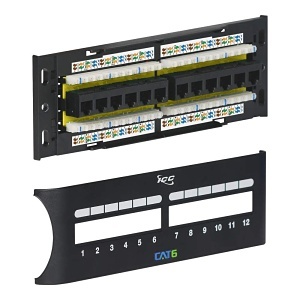
ICC ICMPP12F6E CAT6 Patch Panel, Wall Mount 12-Port Network Patch Panel with Front 110 IDC Terminal Blocks and Removable Cover, UL Listed and PoE++ Rated Gigabit Applications, Black
ICMPP12F6E
|H2-MPP12F6E
Shop All ICC
ICC ICMPP12F6E CAT6 Patch Panel, Wall Mount 12-Port Network Patch Panel with Front 110 IDC Terminal Blocks and Removable Cover, UL Listed and PoE++ Rated Gigabit Applications, Black
ICMPP12F6E | H2-MPP12F6E
Please sign in to view pricing, availability, and to add to cart.
Overview
Specifications
Documents
Product Overview
ICC's CAT6 Patch Panel offers superior performance for Gigabit Ethernet, with front-access RJ-45 ports and 110 IDC termination blocks. Backward compatible with Cat5e and Cat5 cables, this panel is ideal for high-speed data networks. It supports PoE++ up to 100W and features durable, UL-listed materials. The gold-plated contacts and phosphor bronze connectors provide reliability and long-lasting performance. Designed for efficiency, the panel includes color-coded wiring diagrams and numbered ports for easy installation and management, while enhanced crosstalk cancellation improves signal quality.
Main Features
- HIGH-PERFORMANCE CONNECTIVITY: Wall-mounted CAT6 component-rated fixed patch panel with front access to RJ-45 ports and 110-Type connectors, which allow quick moves, adds, and changes (MACs), delivering excellent performance for data networks requiring maximum speed and bandwidth. Backward compatible with Cat5e and Cat5 cabling.
- FUTURE-PROOF AND RELIABLE: Designed for Gigabit Ethernet, ensuring your network is future-proof. Ideal for Gigabit Ethernet switches. Gold-plated contacts ensure a correction-free connection with 50 micro-inches of gold over 100 micro-inches of nickel. Supports Power over Ethernet (PoE++) up to 100W.
- EFFICIENT INSTALLATION AND QUICK REFERENCE: Features 110 IDC termination to reduce installation time. The 110 IDC on the rear can be re-terminated over 100 times. Numbered ports and color-coded TIA-568A and TIA-568B wiring diagrams provide quick and easy reference.
- DURABLE MATERIALS AND SAFETY COMPLIANCE: Jack housing constructed from high-impact, flame-retardant plastic (UL 94V-0 rated) and durable phosphor bronze spring wire. Phosphor bronze alloy 110 connectors with 100 micro-inches of nickel alloy. RJ45 jack can accept over 750 plug to jack insertion cycles. UL listed for fire safety compliance.
- ENHANCED CROSSTALK CANCELLATION: Engineered to exceed ANSI/TIA-568 Category 6 connecting hardware requirements with enhanced crosstalk cancellation, reducing return loss and improving overall network performance.
General Information
Name: ICC ICMPP12F6E CAT6 Patch Panel, Wall Mount 12-Port Network Patch Panel with Front 110 IDC Terminal Blocks and Removable Cover, UL Listed and PoE++ Rated Gigabit Applications, Black
Category: ICC, Data Comm & Networking, Patch Panels, Network Patch Panels
UPC Code: 633758038461
Country of Origin: Taiwan, Province of China. Country of origin is subject to change.
Specifications
ADI Part Number H2-MPP12F6E Brand Name ICC Connector Gender Female Country of Origin TW Manufacturer ICC Manufacturer Part Number ICMPP12F6E Packaged Quantity 2 Product Model ICMPP12F6E Product Name CAT6 Zero-U Front Access Patch Panel with 12 Ports Product Type Network Patch Panel
TAA Compliant Yes
Number of SFP Slots 1 Number of Total Expansion Slots 1
Connector Type RJ45 Number of Network (RJ-45) Ports 1 Number of Ports 1
Color Black Compatible Rack Unit 1U Form Factor Rack Mount, Wall Mount Height 2.40" Material ABS, Gold, Phosphor Bronze Weight 0.80lb Width 3.38"
Length 10.00" Mount Type Rack Mount, Wall Mount
Limited Warranty 3-Year
Additional Information Material:
Jack Housing: High Impact, Flame Retardant Plastic, UL 94V-0
Spring Wire: Phosphor Bronze
110 Connector: Phosphor Bronze Alloy with 100 microinch Alloy
Gold Rating: 50 micro inch gold over 100 mIndoor/Outdoor Indoor Package Contents - CAT6 Zero-U Front Access Patch Panel with 12 Ports
- 4 x 6" Cable Tie
- 2 x 12-24 x 3/4" Pan Head, Pilot Point Machine Screw
- 1 Sheet, Installation Instructions